
Citizen Eco-Drive Watch Manual: A Comprehensive Guide
Citizen’s innovative Eco-Drive technology offers a sustainable and reliable timekeeping experience, eliminating battery replacements. This comprehensive guide details operation and maintenance.
Explore features like solar power, perpetual calendars, and radio-controlled accuracy, ensuring your Eco-Drive watch performs optimally for years to come.
Discover how to charge, set the time, interpret indicators, and troubleshoot common issues, maximizing the benefits of your Citizen timepiece.
Citizen Eco-Drive represents a groundbreaking advancement in watchmaking, born from a commitment to environmental responsibility and technological innovation. Unlike traditional quartz watches reliant on batteries, Eco-Drive harnesses the power of light – any light, natural or artificial – to generate energy.
This ingenious system converts light into electrical power, storing the excess energy in a rechargeable lithium-ion capacitor. This eliminates the need for frequent battery changes, reducing waste and offering unparalleled convenience. Eco-Drive is Citizen’s original technology, a testament to their pioneering spirit.
The technology ensures your watch is perpetually powered as long as it’s exposed to sufficient light, offering a sustainable and reliable timekeeping solution. It’s a fusion of precision, durability, and eco-consciousness, defining a new standard in the world of horology.
What is Eco-Drive?
Eco-Drive is Citizen’s proprietary technology, fundamentally changing how watches are powered; It’s a light-powered watch, meaning it converts various light sources – sunlight, fluorescent, or even indoor lighting – into energy. This energy is then stored within a rechargeable lithium-ion capacitor, effectively powering the watch’s movement.
The core principle is sustainability; Eco-Drive eliminates the need for traditional battery replacements, reducing environmental impact and offering long-term cost savings. A special solar panel, discreetly positioned under the watch dial, captures the light and initiates the energy conversion process.
This innovative system ensures continuous operation as long as the watch is exposed to adequate light, making it a remarkably reliable and eco-friendly timekeeping solution. It’s a testament to Citizen’s dedication to both precision and environmental responsibility.

The History of Citizen Eco-Drive
Citizen’s journey towards Eco-Drive began with a vision for a sustainable and reliable watch. In 1993, after years of research and development, the first Eco-Drive watch was launched, marking a pivotal moment in watchmaking history. This groundbreaking timepiece utilized light as its sole power source, eliminating the need for battery changes.
The initial models faced challenges in achieving consistent performance, but Citizen persevered, refining the technology over the years. Subsequent advancements included improved solar panels, enhanced energy storage, and the introduction of radio-controlled accuracy.
Eco-Drive quickly gained recognition for its innovation and environmental benefits, becoming a cornerstone of the Citizen brand. Today, it represents a commitment to sustainable practices and continues to evolve with cutting-edge technology, solidifying its legacy as a revolutionary watchmaking achievement.
Understanding Your Eco-Drive Watch
Your Citizen Eco-Drive watch is a sophisticated timepiece powered by light, offering both convenience and sustainability. Unlike traditional watches, it converts any light source – natural or artificial – into energy, storing it for operation. Familiarizing yourself with its unique features is key to optimal use.
Eco-Drive watches boast a secondary display indicating charge levels, crucial for understanding power reserves. Many models also feature a perpetual calendar, automatically adjusting for leap years, and some offer radio-controlled timekeeping for atomic clock precision.
Understanding your specific model’s caliber and features, detailed in the accompanying manual, will unlock its full potential. Regular wear ensures consistent charging, while proper care maintains its longevity and accuracy.
Identifying Your Watch Model & Movement Number
Locating your Citizen Eco-Drive watch’s model and movement number (also known as caliber) is essential for accessing the correct manual and support resources. This information is typically found on the watch caseback, often requiring careful examination.
The caseback usually displays a series of numbers and letters. The movement number is a specific code – for example, ‘B877’ – identifying the internal mechanism. Knowing this number allows you to download the precise PDF manual tailored to your watch’s functionality.
Citizen provides a convenient system for finding manuals; you can search by the first character of your caliber. Accurate identification ensures you have the correct instructions for setting, charging, and maintaining your Eco-Drive timepiece.
Locating the Movement Number/Caliber
Finding the movement number, or caliber, on your Citizen Eco-Drive watch is a straightforward process. Typically, this number is engraved on the caseback – the metal cover on the underside of the watch.
You may need to carefully remove the watch strap to fully access the caseback. Look for a series of numbers and letters; the caliber will be a specific alphanumeric code, such as ‘H800’ or ‘B770’. It’s crucial to note this number accurately.
Citizen organizes its manual database by the first character of the caliber. Once located, this number unlocks access to the correct PDF manual, providing detailed instructions specific to your watch’s features and operation.
Key Features of Citizen Eco-Drive Watches
Citizen Eco-Drive watches boast several groundbreaking features setting them apart. Foremost is the solar-powered technology, converting any light source – natural or artificial – into energy, eliminating the need for traditional battery replacements.
Many models include a Perpetual Calendar function, automatically adjusting for leap years and ensuring accurate datekeeping for centuries. Select Eco-Drive watches also feature Radio-Controlled Timekeeping, also known as Atomic Time.

This allows the watch to receive a time signal from strategically located transmitters, guaranteeing exceptional accuracy. These features combine to create a reliable, environmentally conscious, and technologically advanced timepiece.
Solar Power & Charging
Citizen Eco-Drive watches utilize a solar panel discreetly positioned beneath the dial to harness light energy. This innovative system converts both natural and artificial light into electrical power, storing the excess in a rechargeable lithium-ion battery.
Regular exposure to light ensures continuous operation, and even brief periods of illumination can contribute to the charging process. The watch is designed to operate efficiently even in low-light conditions, though charging times will vary.
Consistent wear, even indoors, typically provides sufficient charge. If the watch isn’t worn regularly, intentional charging is recommended to maintain optimal performance and prevent the watch from entering a power-saving mode.
Perpetual Calendar Function
Certain Citizen Eco-Drive models feature a sophisticated Perpetual Calendar function, automatically adjusting for leap years and varying month lengths. This eliminates the need for manual date adjustments, ensuring accurate timekeeping for decades to come.
The perpetual calendar intelligently recognizes the correct date, even after a period without being worn or charged. However, if the watch’s internal capacitor becomes fully discharged, the date may require resetting.
Consult your specific watch model’s manual for detailed instructions on utilizing and, if necessary, resetting the perpetual calendar. This feature contributes to the convenience and long-term reliability of your Eco-Drive timepiece.
Radio-Controlled Timekeeping (Atomic Time)
Many Citizen Eco-Drive watches boast Radio-Controlled Timekeeping, also known as Atomic Time. This technology allows your watch to automatically synchronize with official atomic clock signals broadcast from strategically located transmitters.
Currently, Citizen utilizes signal stations in four regions, enabling accurate time synchronization in various parts of the world. This feature ensures exceptional accuracy, minimizing time deviation and eliminating the need for manual adjustments.
The watch automatically searches for a signal at night. Successful synchronization is indicated by the watch’s display. If a signal isn’t received, you can initiate a manual search. Refer to your model’s manual for specific instructions on utilizing this advanced feature.
Charging Your Eco-Drive Watch
Citizen Eco-Drive watches are powered by light, converting any light source – natural or artificial – into energy. Regular exposure to light is crucial for maintaining optimal performance and preventing over-discharge.
The solar panel, discreetly positioned under the watch dial, captures light and stores it within a rechargeable secondary battery. Consistent wear, even indoors, typically provides sufficient charge. However, prolonged periods of darkness may necessitate intentional charging.
To charge, simply expose the watch to light. The charging time varies depending on the light intensity. A fully discharged watch may require several hours of bright light to regain full functionality. Proper charging ensures your Eco-Drive watch remains perpetually powered.
How Light Affects Charging
The efficiency of charging your Citizen Eco-Drive watch is directly proportional to the intensity of the light source. Bright, direct sunlight provides the fastest charging rate, significantly quicker than indoor lighting.
Fluorescent light offers a moderate charging speed, while incandescent bulbs are less effective. Even indirect sunlight, through a window, contributes to charging, albeit at a slower pace. Cloudy days still provide sufficient light for maintaining the charge, though it will be slower.
Remember, any light source can be utilized. Consistent exposure, even to lower-intensity light, is preferable to infrequent bursts of bright light. Regular wear, even indoors, often keeps the watch adequately charged, ensuring continuous operation.

Charging Indicators & Status Levels
Citizen Eco-Drive watches utilize the seconds hand to communicate charging status. Normal one-second intervals indicate sufficient charge for operation. However, when charging, the seconds hand moves in two-second intervals, confirming light is being converted into energy.
A low charge warning is signaled by the seconds hand moving at two-second intervals for an extended period, potentially accompanied by other indicators depending on the model. This doesn’t mean the watch will immediately stop, but recharging is crucial.
If the watch is fully charged, the seconds hand will return to its standard one-second movement. Monitoring these indicators allows you to proactively manage your watch’s power reserve and ensure uninterrupted timekeeping.
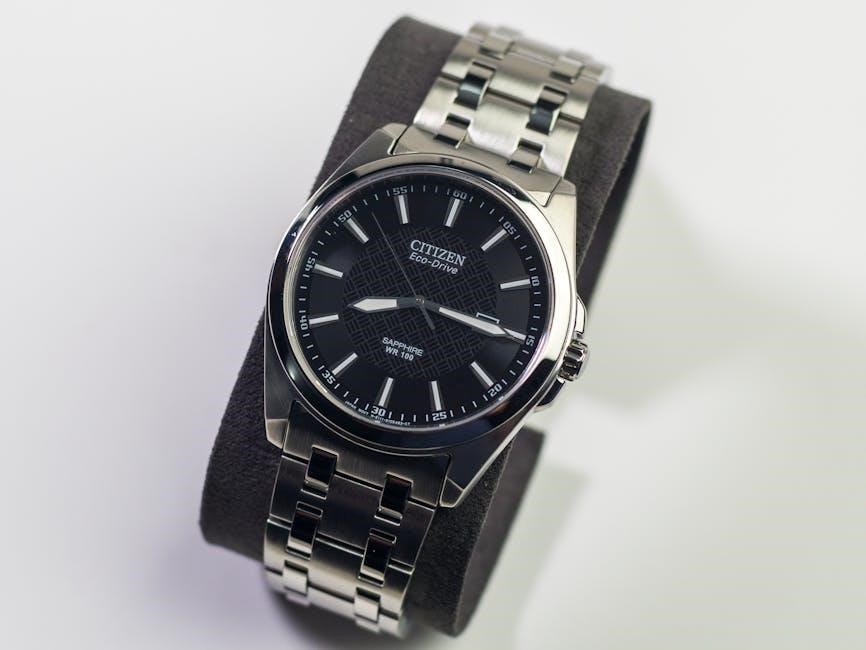
Understanding the Seconds Hand Movement
The seconds hand on your Citizen Eco-Drive watch isn’t just for telling time; it’s a vital indicator of the watch’s power reserve and charging status. Typically, a smoothly sweeping seconds hand moving at one-second intervals signifies sufficient charge for normal operation.
However, during charging, the seconds hand will deliberately jump forward in two-second intervals. This distinct movement confirms the watch is actively converting light into energy. Observing this pattern assures you the solar charging system is functioning correctly.

Deviations from these patterns, like consistently jumping in two-second intervals, signal a low charge level, prompting you to expose the watch to light.
Low Charge Warning Signals
Your Citizen Eco-Drive watch provides clear signals when the power reserve is dwindling. The most prominent indicator is the seconds hand’s movement – it will begin to jump forward in two-second intervals instead of sweeping smoothly. This alerts you to a low charge state, requiring immediate attention.

Some models may also display a specific message or warning on the dial. Prolonged low charge can lead to the watch entering “Power Save” mode, where the seconds hand stops to conserve energy.
Ignoring these warnings can eventually result in the watch stopping completely. Consistent exposure to light after observing these signals is crucial to restore optimal functionality and prevent potential issues.
Setting the Time & Date
Citizen Eco-Drive watches offer straightforward time and date setting procedures, though specifics vary by model. Generally, you’ll begin by pulling out the crown to the first click to access time adjustment. Rotate the crown to move the hour and minute hands to the desired time.
To set the date, pull the crown out to the second click. Rotating the crown will then adjust the date display. Ensure the date changes smoothly at midnight to avoid complications.
After setting, push the crown fully back in to its original position; For watches with radio-controlled timekeeping, manual setting may be less frequent due to automatic synchronization.
Standard Time Setting Procedure
To manually set the time on your Citizen Eco-Drive watch, begin by gently pulling the crown out to the first click – this is the time setting position. Rotate the crown clockwise or counterclockwise to adjust the hour and minute hands until they display the correct time.
Pay attention to the AM/PM indicator if your watch features one. Ensure accurate setting to maintain precise timekeeping. Once the desired time is set, carefully push the crown back to its normal, fully-in position.
Avoid pulling the crown while the watch is submerged, and always ensure it’s securely pushed back in to maintain water resistance.
Setting the Date

To set the date on your Citizen Eco-Drive watch, first pull the crown out to the second click – this position is specifically for date adjustments. Rotate the crown counterclockwise to advance the date. Be cautious when setting the date, especially near the end of the month, to avoid damaging the mechanism.
If setting the date around the transition from the 31st to the 1st, complete a full rotation of the crown and then adjust to the correct date. Once the correct date is displayed, gently push the crown back to its normal position.
Always ensure the crown is fully seated to maintain the watch’s water resistance.
Using the Radio Signal Reception Feature
Citizen’s radio-controlled watches automatically receive time signals from atomic clocks, ensuring exceptional accuracy. To initiate reception, ensure you’re in an area with a clear view of the sky and away from strong radio interference. Your watch will attempt to receive a signal automatically overnight.
You can also manually initiate reception by pulling the crown to the second click and holding it for a few seconds until the hands begin to spin rapidly. The watch will search for a signal; successful reception is indicated by the hands pointing to a specific confirmation position.
This feature receives signals from one of five stations located in four regions.
Initiating Radio Signal Reception
To manually begin radio signal reception, first, ensure your Citizen Eco-Drive watch has sufficient charge. Then, pull the crown out to the second click – this is the time setting position. Hold the crown in this position; the second hand will begin to move rapidly, indicating the search for a signal has commenced.
During the reception process, maintain a clear view of the sky and avoid strong radio interference. The watch will automatically attempt to connect to the nearest time signal station. Successful synchronization is confirmed when the second hand points to a designated position, typically indicating a successful reception.
The process may take a few minutes, so patience is key.
Troubleshooting Radio Signal Reception
If your Citizen Eco-Drive watch fails to synchronize with the radio signal, several factors could be at play. First, verify you are in an area with adequate signal coverage; reception is best outdoors, away from tall buildings and radio interference.
Ensure the watch has sufficient charge, as a low battery can hinder signal reception. Try initiating the reception process manually, holding the crown in the second click for an extended period; If unsuccessful, move to a different location and repeat the process.
Check for potential interference from electronic devices. If problems persist, consult the official Citizen manual or contact Citizen support for further assistance.
Maintaining Your Eco-Drive Watch
Proper maintenance ensures your Citizen Eco-Drive watch continues to function flawlessly for years. Regularly clean the watch case and band with a soft, damp cloth, avoiding harsh chemicals or abrasive cleaners. Pay particular attention to the areas where the band connects to the case.
While Eco-Drive watches are designed to be durable, avoid subjecting them to extreme temperatures or strong impacts. Regularly check the water resistance, especially if you frequently expose the watch to water.
If the watch isn’t regularly exposed to light, consider occasional manual charging to maintain optimal performance. Following these simple steps will preserve your Citizen timepiece’s beauty and accuracy.
Cleaning & Care Instructions
To maintain the pristine condition of your Citizen Eco-Drive watch, regular cleaning is essential. Use a soft, slightly damp cloth to wipe the case, crystal, and band. Avoid using solvents, strong detergents, or abrasive materials, as these can damage the finish.
For metal bands, a soft brush can help remove dirt from the links. Leather bands should be cleaned with a leather-specific cleaner and conditioner. Ensure the crown is fully closed before cleaning to prevent water damage.
Rinse the watch with clean water after exposure to saltwater or chlorine. Dry thoroughly with a soft cloth. Proper cleaning preserves the watch’s appearance and longevity.
Water Resistance & Precautions
Citizen Eco-Drive watches offer varying degrees of water resistance, indicated by ATM (atmospheres) or meters. Understand your watch’s specific rating before exposure to water. A rating of 50m/5ATM is suitable for everyday splashes, but not swimming. 100m/10ATM is appropriate for swimming and snorkeling, while higher ratings are for diving.
Avoid operating the crown or pushers while underwater. Regularly inspect the crown gasket for damage. Water resistance isn’t permanent and can diminish over time due to wear and tear.
If water enters the watch, immediately stop using it and have it serviced by a Citizen service center. Avoid extreme temperatures and humidity, as these can affect water resistance.
Troubleshooting Common Issues
Watch Not Charging: If your Eco-Drive isn’t charging, ensure sufficient light exposure. Try different light sources – direct sunlight is most effective. Check for obstructions blocking the solar panel. If the issue persists, the watch may require professional servicing.

Time Not Synchronizing: For radio-controlled models, ensure you’re within range of a signal transmitter and initiate reception manually. Obstructions like buildings can interfere. Verify the correct time zone setting. If synchronization fails repeatedly, contact Citizen support.
For other issues, consult the full manual or visit a Citizen service center. Regular maintenance can prevent many problems.
Watch Not Charging
If your Citizen Eco-Drive watch isn’t charging, the first step is to ensure adequate light exposure. Direct sunlight is the most effective charging source, but bright indoor light can also work, albeit slower. Confirm nothing is obstructing the watch face, specifically the solar panel beneath the dial.
Insufficient light over extended periods is a common cause. If the watch hasn’t been exposed to sufficient light recently, allow it to charge uninterrupted for a full day. If charging still doesn’t occur, immediately take the watch to an authorized Citizen dealer or service center for inspection.
A professional assessment can identify potential issues with the solar cell or internal circuitry.
Time Not Synchronizing
If your Citizen Eco-Drive radio-controlled watch fails to synchronize with the atomic time signal, several factors could be at play. Ensure you are within range of a transmission tower – these are located in four regions globally. Obstructions like tall buildings or indoor locations can hinder signal reception.
Initiate manual signal reception in a clear, open area, away from potential interference. The seconds hand will indicate the reception process. If synchronization repeatedly fails, check the watch’s time zone setting; an incorrect setting prevents successful synchronization.
If issues persist, consult Citizen’s support resources or a service center for assistance, as internal components might require evaluation.
Downloading the Official Citizen Eco-Drive Manual (PDF)
Citizen provides readily accessible digital manuals for most Eco-Drive watch models. Obtaining the official PDF manual ensures you have the most accurate and detailed information specific to your timepiece. These manuals typically span around 58 pages, offering comprehensive guidance on all features and functions.
You can locate the correct manual on Citizen’s official website. The process involves identifying your watch’s movement number (caliber), which is crucial for selecting the appropriate PDF document.
Downloading the manual allows offline access to troubleshooting tips, charging instructions, and detailed explanations of your watch’s capabilities, enhancing your ownership experience.
Finding the Correct Manual for Your Caliber
Accurately identifying your Eco-Drive watch’s caliber (movement number) is paramount to downloading the correct manual. Citizen organizes its digital manuals based on these unique caliber designations. To locate your caliber, consult your watch’s caseback; it’s typically engraved with a series of numbers and letters.
On Citizen’s website, a dedicated section allows you to browse manuals by the first character of your movement number. Clicking the corresponding letter directs you to a list of calibers starting with that character.
Selecting the precise caliber ensures you receive instructions tailored to your watch’s specific features and functionalities, guaranteeing optimal usage and understanding.
Accessing Citizen’s Support Resources
Citizen provides a comprehensive suite of support resources to assist owners with their Eco-Drive watches. Beyond downloadable manuals, their official website offers a frequently asked questions (FAQ) section addressing common concerns and troubleshooting steps.
For more personalized assistance, Citizen maintains a network of authorized service centers globally. These centers are equipped to handle repairs, maintenance, and complex inquiries regarding your timepiece.
Locating a Citizen Service Center near you is easily done through the Citizen website’s store locator tool. Contacting Citizen directly via their customer service channels provides another avenue for support.
Citizen Service Center Locations
Citizen understands the importance of accessible service for its Eco-Drive watches. To find an authorized service center, the most reliable method is utilizing the official Citizen website’s store locator tool. This tool allows users to search by zip code, city, or state to pinpoint nearby locations.
These authorized centers employ trained technicians skilled in Eco-Drive technology, ensuring qualified repairs and maintenance. Services offered typically include battery replacements (though rarely needed!), band adjustments, movement servicing, and genuine part replacements.
Citizen’s website provides contact details – addresses, phone numbers, and operating hours – for each listed service center, facilitating easy connection. Prior to visiting, confirming appointment availability is recommended.